TableGenie Dine · restaurants, cafés & bars

Fill your tables — on your terms.

Diners find your place in the TableGenie app, see the offer you chose, and book a table at a time you still have seats. You confirm, seat them and settle the bill in the partner app — and pay a commission only on bills settled through it.

  • Your offer, your call
  • Seats per time slot you set
  • Commission only on app bills
  • Reviews only from real visits
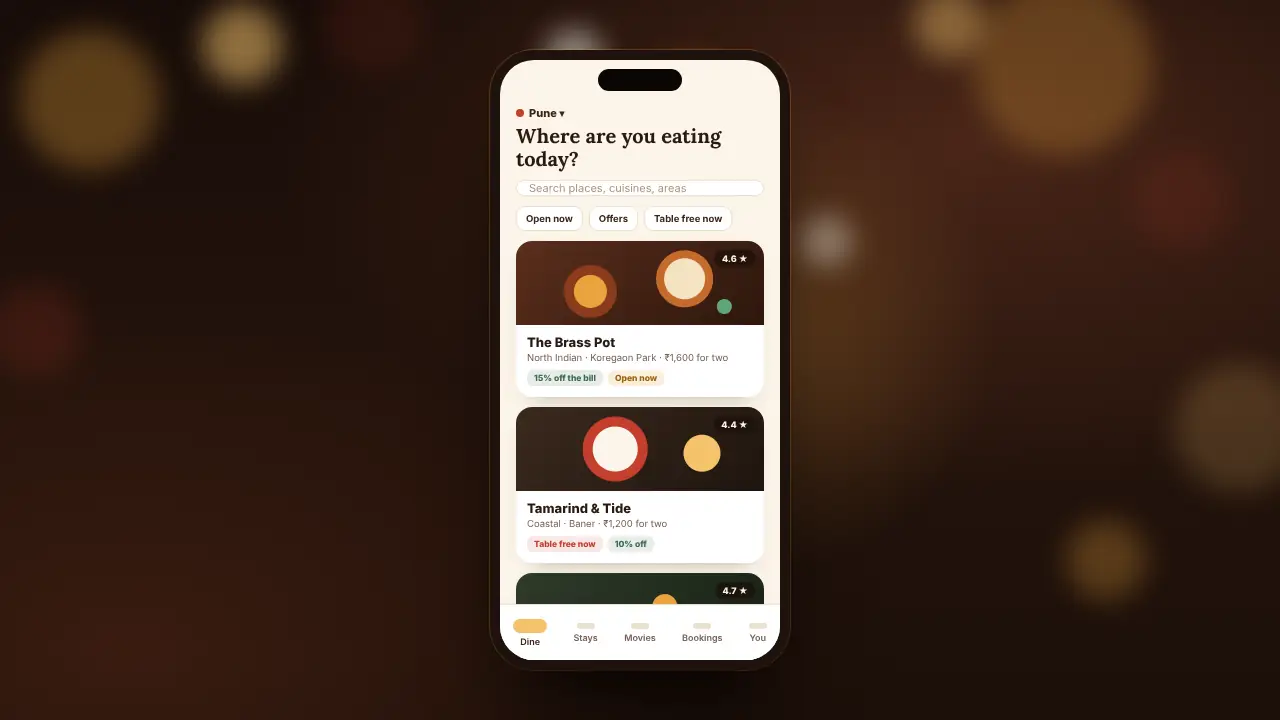
A phone showing the TableGenie app: places nearby, with their offers and whether they are open. Scroll to play

Friday, 6 pm. Where are we eating?

Open now, 15% off, a table at 8:30 — booked.

At the door, a six-character code — and the table is waiting.

The bill, with the offer already taken off.

The film

One minute, from "where shall we eat" to a settled bill.

What the diner sees in the app, what your floor sees in the partner app, and the bill at the end of it.

Sound optional — every word is on screen.
How it works

One booking, two apps, nobody on the phone.

Diners book in the TableGenie app. Your floor runs the evening in the TableGenie Dine partner app — on the host-stand tablet, the manager's phone, or both.

For the diner

Find a place, see the offer, book a table.

In the TableGenie app: places by city, what is open now, which have a table free right now — and a booking in a few taps.

  • Photos, menu pages, hours, the offer and reviews from people who went
  • Only a time with seats left for their party can be booked
  • A six-character code and a QR to show at the door
  • Plans changed? Cancel in the app, and the seats go back to you
Sign-in by phone number · no password
For your place

Your evening, in the partner app.

New requests chime, and bookings reach your inbox too. You decide how bookings work, and the app keeps the count of seats for you.

  • Confirm each request yourself, or let bookings confirm instantly
  • "They're here", "No-show" — and a no-show only after the table's hold time
  • Settle the bill: enter it, and the diner's discount is worked out to the paisa
  • Walk-in status in one tap: table free now, short wait, full
Works on any phone, tablet or PC browser
What you decide

Your place, your rules. The app keeps them.

Your offer is agreed with us and set on your listing. The rest you keep up to date yourself, in "Your listing" — and the booking rules are enforced on our server, not left to a phone.

Your offer

The discount diners get for booking in the app, an optional ceiling in rupees and your terms — proposed by you, set on your listing by us.

Seats per time slot

How many guests each slot can take. A slot is never sold past it.

How far ahead

How many days out diners can book, and how close to the time.

Party size

The biggest table the app books. Bigger groups call you.

Confirm or instant

Approve each request, or let bookings confirm the moment they are made.

Hold time

How long a table waits for a late party before it can be a no-show.

Hours & closures

Opening hours, weekly closed days, and the dates you are shut.

Photos & menu

Your photos and menu pages — and your live TableGenie menu, if you run ordering on it.

The partner app

The host stand, on one screen.

Today's tables, the requests waiting for an answer, the bill to settle — and what you owe, with every bill behind it.

  • Requests that chimeConfirm, or decline with a reason the diner sees. A request nobody answers closes itself when its time comes.
  • Today, by the hourWho is coming, how many, the occasion and the note — seat them as they arrive.
  • Settle the billEnter the bill; the app shows the diner's discount and what they pay, exactly as our server works it.
  • Your statementEvery bill settled through the app, this month's totals, what you owe and every payment against it.
  • ReviewsStars and comments from diners whose bill you settled — nobody else can review you.
Fair to both sides

Rules a diner can trust, and a restaurant can too.

Seats counted on the server

Every booking takes its seats from the slot in one step, so two diners can never get the last table.

No-shows, fairly

A booking can be marked a no-show only after its time and your hold time have passed. Three, and that diner books by phone.

Reviews from real visits

Only a diner whose bill was settled through the app can rate a visit — once, within a month of it.

Your deal stays private

The commission you agree, what you owe and how much business you do are never on your public listing — only you and we see them.

The discount is the server's sum

The diner's discount and what they pay are worked out by our server from the offer they booked with — never typed in by hand.

Diners' details, kept close

You see the name, phone and note on a booking at your place. Other places never do, and a diner can delete their account.

The deal

What it costs, said plainly.

We agree your terms with you before your listing goes live. There is nothing to pay on a diner who walks in, or a table booked by phone.

Your offer to diners
A discount you choose.

The percentage off the bill diners get for booking through the app, with a ceiling in rupees if you want one, and your terms — weekdays only, food only, whatever suits you. You propose it; we set it on your listing.

  • Shown on your listing and in every booking
  • Locked in for each diner when they book
  • Want a new offer? Tell us — it applies to new bookings
Our commission
Only on bills settled through the app.

A percentage of what the diner actually paid — after your discount, never on money you did not receive. If agreed, a small fee per guest seated through the app.

  • Agreed with you before you go live
  • Every bill, discount and commission on your statement
  • Pay against it whenever you settle with us

A bill, worked through — with a 15% offer capped at ₹500

Bill for a table of four₹3,400
15% off, capped at ₹500− ₹500
The diner pays you₹2,900
Commission is worked on₹2,900, not ₹3,400

The offer here is an example; yours, and our commission, are agreed with you.

The TableGenie app

One app for an evening out.

Where diners find you — and book a stay at a TableGenie hotel, or see what is on at a TableGenie cinema, with the same sign-in. Every booking in one place.

Coming soonAndroid Coming sooniPhone
DinePlaces nearby, what is open, who has a table free now — and a table booked with the place's offer.
StaysHotels on TableGenie Stays, booked direct with the hotel: pay at the hotel or online to it.
MoviesShowtimes at TableGenie cinemas, the snack menu, and food ordered ahead for pickup.
BookingsTables and stays, coming up and past — cancel, pay, rate a visit, find your way there.
Questions

What restaurateurs ask us first.

What does it cost to be listed?

Your terms are agreed with you before your listing goes live, and the commission is charged only on bills settled through the app — a percentage of what the diner paid after your discount, and, if agreed, a small fee per guest. Walk-ins and phone bookings carry nothing.

Who decides the discount?

You do — the percentage, an optional ceiling in rupees and the terms — and we set it on your listing. Diners see it there, and the offer they booked with is the one their bill gets, even if it changes later.

Can the app overbook us?

No. You set how many guests each time slot can take, and every booking takes its seats from that count on our server in one step. When a slot is full, the app stops offering it. Need to hold seats back? Lower the number, or close a date.

What happens when a diner doesn't turn up?

Once the booking's time and your hold time have passed, mark it a no-show and the seats go back to you. A diner with three no-shows can no longer book in the app.

Do we need new hardware?

No. The partner app runs in the browser of any phone, tablet or PC — the host-stand tablet is the usual home for it.

We already use TableGenie for QR ordering. Does it connect?

Yes — we link your listing to your café on TableGenie, and diners see your live menu in the app.

When will diners be able to download the app?

The TableGenie app is on its way to Google Play and the App Store. Places that list now are ready for its first diners.

List your place

Two minutes to apply. We take it from there.

Tell us about your place and the offer you have in mind. We call you, agree your terms, set up your listing with you and give your team its partner-app login.

List your restaurant
  1. ApplyYour place, your contact, the seats you have and the offer you would like to make.
  2. We call youTo agree your offer and our commission — nothing goes live before you say yes.
  3. Your listingPhotos, menu pages, hours and how bookings work, set up with you.
  4. LiveYour partner-app login, and diners booking your tables.